

EDIT: I abandoned my script in favor of Andy Tran’s CopyCat!
Problem
I use Claude Code in terminal all day. This drives me crazy: I take a screenshot, switch to terminal, hit Cmd+V — and nothing happens.
Cmd+V into terminal doesn’t paste images on macOS, because reasons. Claude Code offers Ctrl+V as a workaround, my muscle memory is Cmd+V, and I’d rather not retrain a thirty-year-old reflex.
Options
Karabiner-Elements can rebind Cmd+V to run a shell script when iTerm is frontmost. I tried vibe coding it. It didn’t work, too many layers of weird interactions.
clipaste, someone else built something similar, but it was designed to allow pasting images over tmux with an SSH remote tunnel—too much extra complexity for me.
Building a custom Swift app is a bit too much hassle.
The Solution
Hammerspoon turned out to be the sweet spot. One config file, one permission, one process. The eventtap API is the documented way to intercept keystrokes conditionally on the frontmost app. The system clipboard is never touched. The whole thing fits in 30 lines:
local ITERM_BUNDLE = "com.googlecode.iterm2"
local CACHE_DIR = os.getenv("HOME") .. "/.cache/iterm-paste-fix"
hs.fs.mkdir(CACHE_DIR)

local cmdV = hs.eventtap.new({ hs.eventtap.event.types.keyDown }, function(event)
local flags = event:getFlags()
local isCmdV = event:getKeyCode() == hs.keycodes.map["v"] and flags.cmd and not flags.alt and not flags.ctrl and not flags.shift
if not isCmdV then return false end

local app = hs.application.frontmostApplication()
if not app or app:bundleID() ~= ITERM_BUNDLE then return false end

local image = hs.pasteboard.readImage()
if not image then return false end

local path = string.format("%s/screenshot-%s.png", CACHE_DIR, os.date("%Y%m%d-%H%M%S"))
if not image:saveToFile(path) then return false end

hs.eventtap.keyStrokes(path)
return true
end)

cmdV:start()
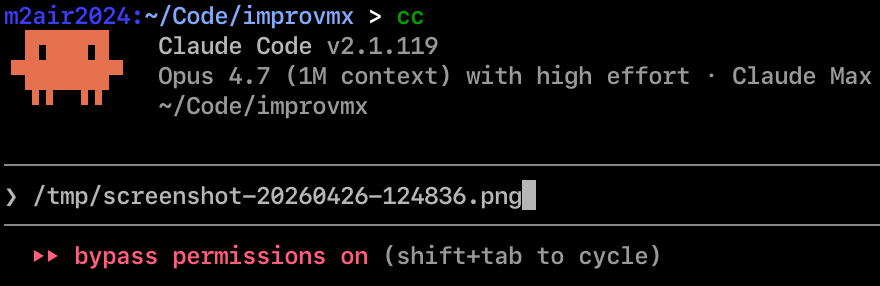
Cmd+V in terminal: if the clipboard is an image, save it as a PNG and type the path. Otherwise, pass through. In any other app, untouched. In iTerm with a text clipboard, untouched. Claude Code sees the path and reads it as an image attachment.
Honestly, the right place for this is inside Claude Code itself. There are at least five GitHub issues asking for it; the most active one, #2102, has been open for months. I’m not holding my breath for Anthropic to fix this, so for now, this Lua snippet is doing the job.
I really love how Claude Code lets me easily write customization layers on top of existing apps. I’m a super picky computer user, and it always killed me begging software maintainers to write the thing I need.
The full setup lives in my repo.